


Beautyfort-API-integration-with-Shopify

January 28, 2025 2025-07-17 1:02

Beautyfort API Integration with Shopify

Simplify your Dropshipping with Digilynx

At Digilynx, we specialize in Beautyfort API integration with Shopify, offering tailored solutions that seamlessly connect your Shopify store with Beautyfort's powerful platform.

Beautyfort API Integration

Why Beautyfort API Integration?

If you’re in the beauty and cosmetics business, managing inventory and orders across multiple platforms can be time-consuming and prone to errors. With Beautyfort API integration with Shopify, you can automate your operations, improve accuracy, and focus on scaling your dropshipping business.

For dropshippers, the Beautyfort-Shopify integration is a game changer:

  • Eliminate the hassle of managing inventory manually.
  • Ensure orders are fulfilled directly from Beautyfort without additional steps.
  • Save time and reduce costs by automating repetitive tasks, allowing you to focus on marketing and customer acquisition.

Why Digilynx

At Digilynx, we are experts in integrating Beautyfort with Shopify. Our team has successfully implemented numerous API integrations, creating custom solutions tailored to each client’s needs. With our experience, you can trust us to:

  • Seamlessly integrate Beautyfort’s API with your Shopify store.
  • Provide ongoing support to ensure smooth operations.
  • Customize the integration to fit your unique business requirements.

The Beautyfort-Shopify API integration is your key to automating processes, reducing errors, and growing your dropshipping business. Let our team at Digilynx help you set it up efficiently and maximize your store's potential.

Beautyfort-Shopify Sync App

Our Beautyfort Shopify Sync App streamlines your dropshipping operations with automated product imports, real-time order updates, and seamless category mapping.Here are some key Features of our Beautyfort-Shopify Sync App:

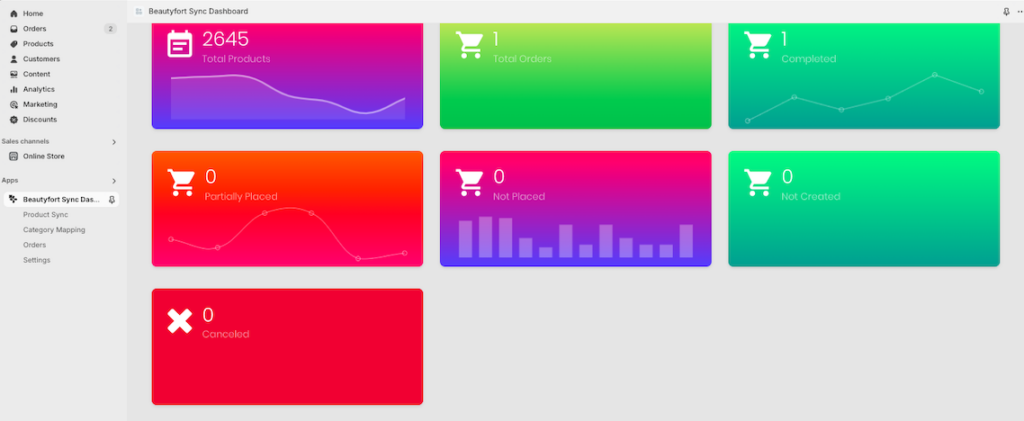
Dashboard Overview

  • Track imported products, completed orders, and real-time order statuses.
  • View a summary of order activity from the last 7 days.

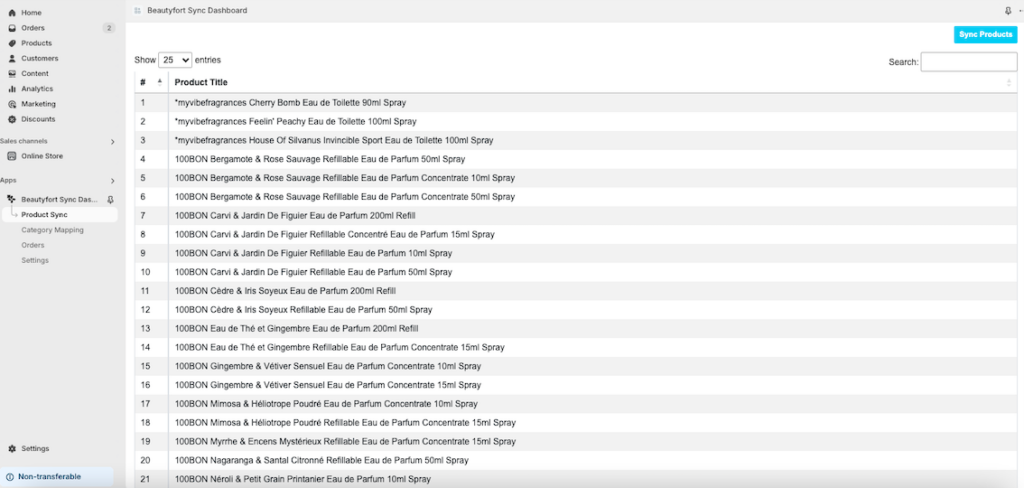
Automated Product Sync

  • Import Beautyfort products automatically or manually with a single click.
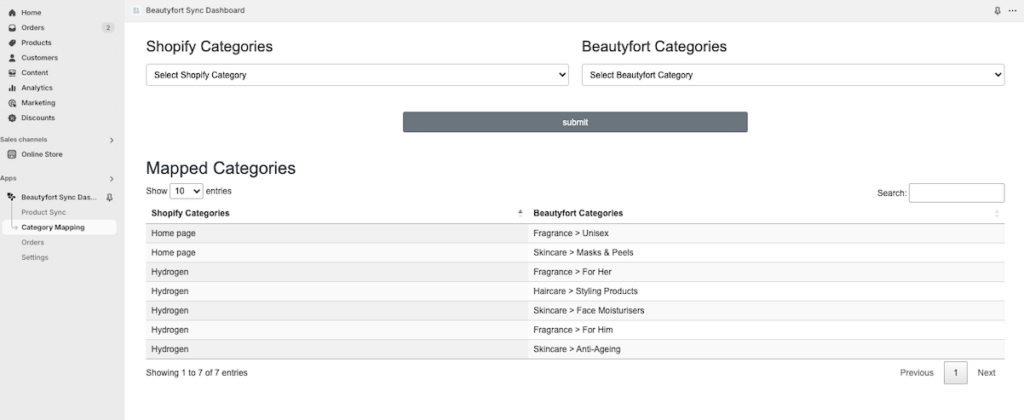
  • Map Beautyfort categories to Shopify collections for precise organization
  •  

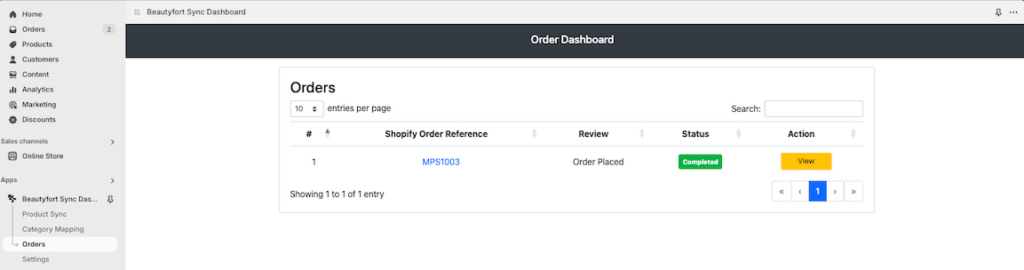
Order Management

  • Manage all Shopify orders linked to Beautyfort.
  • Update order statuses, handle partially placed orders, and sync tracking information directly to Shopify.

Customizable Settings

  • View a summary of order activity from the last 7 days.

  • Set pricing markups and inventory thresholds to optimize your product listings.
  • Easily integrate with Beautyfort via API credentials and webhooks.
  • Configure settings, map categories, and start importing products within minutes.

App Dashboard

Beautyfort integration dashboard

Product Syncronizer

Beautyfort integration product synchronizer

Category Syncronizer

Beautyfort integration Category mapping

Order Dashboard

Beautyfort integration orders dashboard

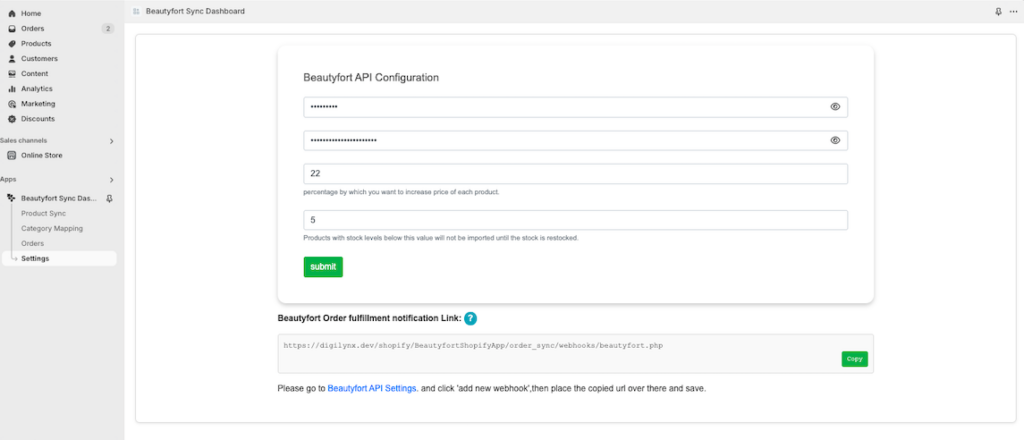
Settings Page

Beautyfort integration settings

App Packages

Feature🌟 Package 1: Full Code Ownership 🌟Package 2: Subscription Service
💰 Setup & FeeIncludes code transfer, configuration, and testing. One-time fee$99 USD/month subscription fee.
📜 Code OwnershipComplete ownership of the source code.No ownership; code remains on Digilynx’s server.
🖥️ HostingHosted on the client’s server.Fully hosted and maintained by Digilynx.
🔧 Control & CustomizationFull control and flexibility to modify the app as needed.Pre-defined features only; no customizations available.
🤝 SupportPost-setup support available at an hourly rate.Support included in the monthly subscription fee.
✅ Ideal ForBusinesses wanting ownership and the ability to make modifications.Businesses preferring a hassle-free service with no server setup.
Choose PackagePackage 1Package 2

FAQs

Have you got your answer? Contact US

What does the Dashboard tab display?

The Dashboard provides an overview of key metrics, such as the number of imported products, total orders, canceled orders, and completed orders. It also displays a table of recent orders from the last 7 days for quick insights.

How does the Product Sync page work?

The Product Sync page lists all imported products with their details. While the app automatically syncs products at regular intervals, you can manually sync products anytime by clicking the “Sync Products” button.

What is Category Mapping, and why is it important?

Category Mapping allows you to link Shopify collections to Beautyfort product categories. This ensures imported products are automatically placed in the correct Shopify collection, streamlining organization and display.

How are orders managed in the Orders tab?

The Orders tab lists all orders and their statuses, including:

  • Not created: Orders placed in Shopify but not created in Beautyfort.
  • Partially placed: Orders created in Beautyfort but missing some items due to stock issues.
  • Not placed: Orders not placed due to all items being out of stock.
  • Completed: Fully processed orders with tracking information.
    Users can manually update, add items, and finalize orders as needed.
What are the key settings required for app configuration?

To configure the app:

  • Enter your Beautyfort API username and secret key.
  • Set the price markup percentage for Beautyfort products.
  • Define an inventory threshold to prevent out-of-stock products from being listed.
  • Copy the provided webhook URL into your Beautyfort account under the API section.
What happens if a product is out of stock?

The app uses the inventory threshold setting to skip listing products with low stock levels. If stock is replenished, the product will be automatically listed in your Shopify store.

Can I manually update orders or products?
Yes, the app provides manual controls for syncing products, updating orders, and adding items to partially placed or not created orders.
How does the app handle tracking information?

When Beautyfort marks an order as fulfilled, the app automatically updates the order status in Shopify, adds the tracking information, and ensures your customers receive the tracking details

Is there a step-by-step guide to get started with the app?

Yes, here’s the basic setup process:

  1. Configure the Beautyfort API settings in the Settings tab.
  2. Complete category mapping for Shopify collections and Beautyfort categories.
  3. Start importing products and managing real-time data across all tabs.
What happens if I need help with the app?

Our support team is ready to assist with configuration, troubleshooting, or any other questions to ensure

We cant wait to meet you!

Let's Talk

Dark

Light

Dark

Light